PCMag.com Latest Articles

Translate

Web radio

søndag 11. september 2016

Arturia Analog Lab - My notebook on things - How to make Arturia Analog Lab work in Fl Studio

My keyboard is Arturia Analog Lab.

So i wanted to make some notes on my blogg, about this keyboard. I will edit this as i learn along.

So who use Arturia Keyboard. Well Moby showed his studio on his facebook this week. And there you clearly see he uses Arturia.


I am using an Ipad as an drum machine. And i use other software that i will show as we go along .


First here is some videos.


I found out that a really importen issue is use the keys in Fl studio.

And i never installed all software. Because i am like all men " i know all hehe" and never read any manual.

 MIDI Control Center

This is how you get the keys to work under Fl Studio.


See "cutoff and emphasis"


This will never work if you  not install MIDI Control Center in Fl Studio.

And Arturia support do not understand how to do this. 

After long time i found this out by myself.

The next is to make this link to controller i fl studio.


See other that has problem in same way as me.


I love all synth. And one that is really hard to come over is NI Kore.When i need that extra in a tune. Then a start up Kore. But as it is hard to install under new OS. I will not give you this know how here.

In my example.

here is my start

I add a tone in first level. Then i add a bass. Analoglab 3 i want to add some more .

Then i Use Kore 2.Why because it is amazing.


I add this in pattern 1


 Pattern 2 - Kore 2

I do not know why but after i installed MIDI Control Center, then the settings changed to this.
 Before it was only Arturia minilab.
But now i am able to use all knob in my keyboard. 


Something that i learn is this

 By click on this and choose the tone see the two tone in orange.

Then you can make some really nice drum effekt.


 This also is possible to tune

And the sound is amazing


 So this is possible to makeautmation clip on.And we can link to controller and let the sound change as we go along.


FL Studio Guru | Creating Permanent Controller Links


FL Studio: How to hook up (Link) your Midi Controller FASTEST & EASIEST


FL Studio: How To Link a 3rd Party VST to an Ext. Midi Controller


--------------------------------------------

Arturia Analog Lab 2 Tutorial


The problem with Arturia Minilab is:

If you not start up MIDI Control Center first then no knob will work under FL studio.

1. Start up MIDI Control Center - Press sync
2. Start up Fl Studio
3. Start up Arturia Plugins
4. Now it should work

If this is not done i have found out that all knobs are useless in Fl Studio.


But there is also problem here. Sometimes i found out that this picture not come

Under Arturia minilab it should say sync 1. But many times it comes with FAIL.
Then nothing work.
I have found out that if i sync again and restart FL Studio then all working. 

There must be something that is connected to input port.

Because if input port is ---
Then nothing

When i changed this to : 0 , then knobs worked


So to make Arturia Minilab work under FL Studio then you need

Input port til be same as:


and to sync the controller with MIDI Control Center


The next that i need to find out is how to make all knobs work under different VST then Arturia.


And i belive FL Guru has the answer in his video above
So now i study this video
https://www.youtube.com/watch?v=5lTDnAx0sgE


1.

Change from this

To this


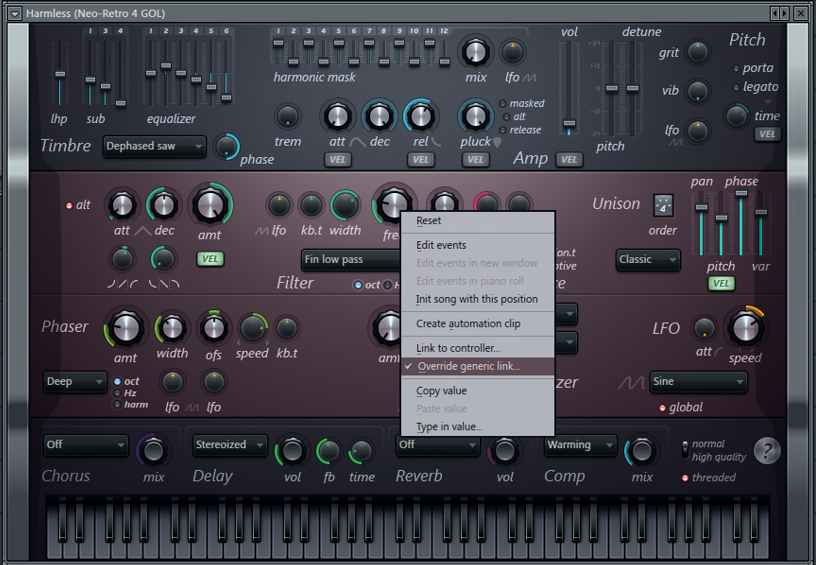
2.Override generic link


Well Fl Guru was right. Now i got my Arturia Analog Lab working under Harmless.


But there was a problem
The knob act strange.


Under MIDI Control Center


Here is the solution

Change it medium


Override generic link choose a knob you would like to use on Arturia Analog Lab.

I just chose Cutoff knob to handle Frekvens in Harmless.

But remember that in MIDI Control Center
the settings need to be medium

This might be the trick to have other VST handled by Arturia keyboard


And what i always wanted to do, has now been fixed.

A small autmation clip and now , well see video above.

----------------------------------------------------------------
So now for badly behaved VST

We want to use the knob on Arturia in other VST

But problem is that some is not so easy to - Override generic link on

So here is how

 1. Go to Current project - Generators


2.Fruity Wrapper
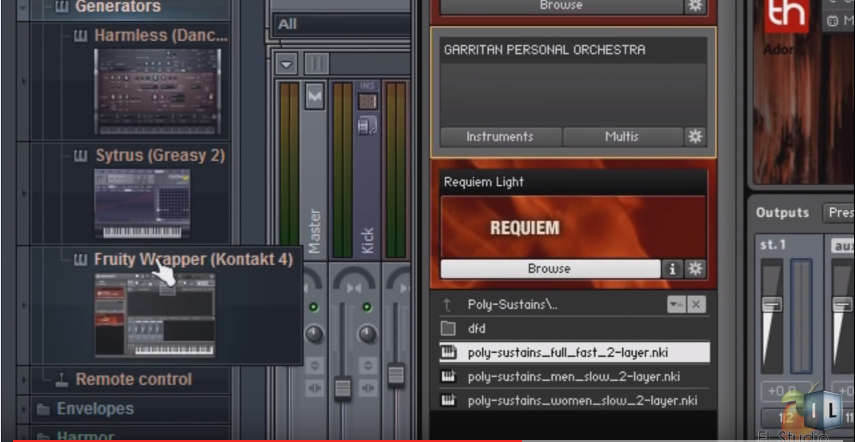


3.Here is the selection of knobs that your VST has. And we need to sort out what knob is to what.

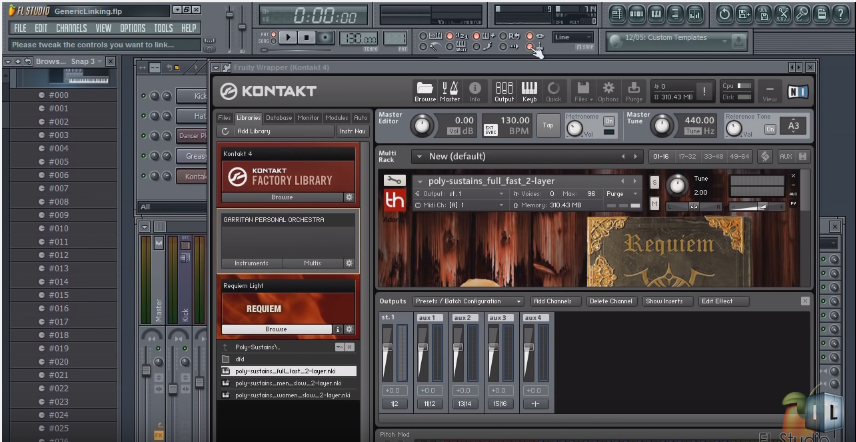
4. Select same as before, but this time click on target interface list


5.


6. The select Override generic link


Tweek the knob that you want on your kontroller and you are done.

So with this lets try to see if Arturia is possible to use cutoff


To find the knob in in the list that you want to use in Nexus.

Just move it.

Then i Selected Override generic link  and moved cutoff on Arturia keyboard. And yess we have a lift off.


fredag 2. september 2016

Just a relax moment

Ok. So i am trying to make so music in my spare time.

  1. My soundcloud account - https://soundcloud.com/crosley-746651281
  2. My youtube videos - https://www.youtube.com/channel/UCFM2J0tvU0SfP4cS0o9g8cA/videos?sort=dd&view=0&shelf_id=0
First of all i just do it to have some fun. It is like you paint something and then you learn something new after every day. (By the way, i really do paint too)

There are many that is much better then me. I just do this to learn something new everyday. And see if i can create something beautiful.

To day i created a tune i called Norwegian Fjords.


mandag 4. juli 2016

How to Resolve Issues with Missing Samples for a KONTAKT Library (Batch re-save)


Source:
https://www.native-instruments.com/en/support/knowledge-base/show/2577/how-to-resolve-issues-with-missing-samples-for-a-kontakt-library-batch-re-save/

This article explains how to Batch re-save a Library in KONTAKT 5. This function can help if you get a Samples Missing dialog when trying to load an Instrument from a particular KONTAKT Library.

This means that the KONTAKT Instrument is unable find its samples. For example, this can happen if you have moved the Library from one computer to another; the file paths of the samples now invalid.

Performing a Batch re-save will correct the file paths of the samples for all KONTAKT Instruments within a Library.

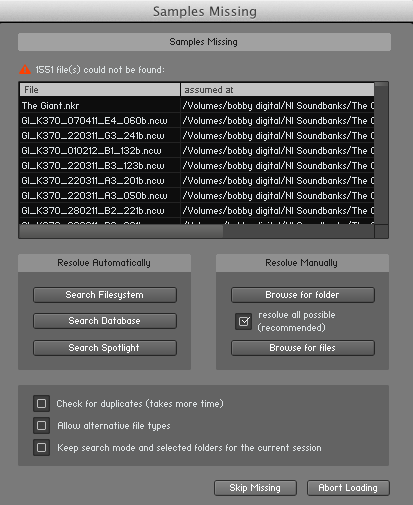
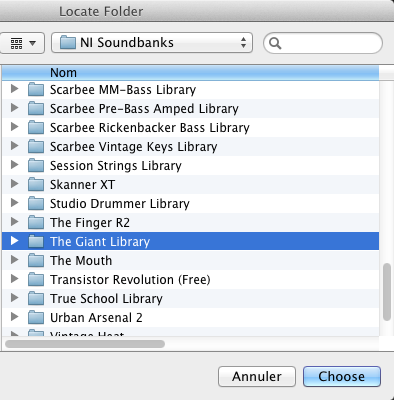
In this example, we try to load The Giant Instrument from THE GIANT Library, but KONTAKT cannot locate the samples corresponding to the Instrument.

To resolve this issue, follow these steps:
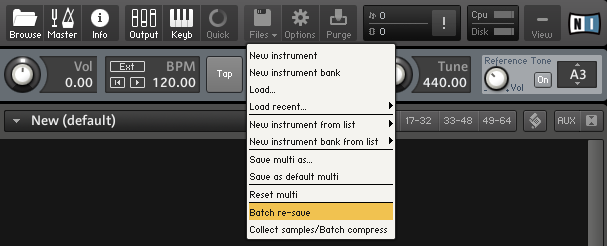
  1. Select Batch re-save from the File drop-down menu within KONTAKT's Main Control Panel.
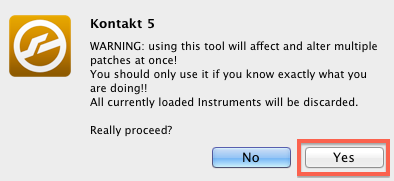
  2. A warning dialog appears. Click Yes to proceed.
  3. Locate the Library folder in the OS X Finder or Windows Explorer. In this example, we are selecting The Giant Library. Once selected, click Choose to proceed.
  4. At this point, KONTAKT will check the Library. If samples are missing, a Samples Missing dialog will appear. In this dialog, click Browse for folder.
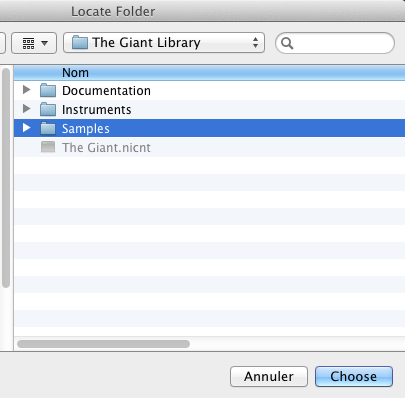
  5. In the Locate Folder window which now appears, select your Library's Samples folder. Once selected, click Choose to proceed.
KONTAKT will now batch re-save the Library and re-link all the Library's Instruments to their respective sample content. Your KONTAKT Library's Instruments will now load correctly.

900 Free Nexus Expansions & Presets

Presents for nexus
Source

http://hiphopmakers.com/free-nexus-expansions-free-nexus-presets

Free Nexus Expansion Packs

Wrecks Nexus Trap Expansions – 131 Presets
Nice Keys Nexus Expansion – 34 Presets
Young Chop Nexus Presets – 9 Presets
The “Trap Kid” Free Nexus XP – 44 Presets
Trap Cookup Nexus Expansion – 40 Presets
Gold Bricks Nexus XP – 100 presets
Free Trap or Die Nexus Expansion  – 70 Presets

C-RAM’s “Straight From Da Trap 3” Free Nexus XP – Filled with over 50 sounds for Hip Hop, Trap, R&B, and Pop
Free “Trap Luv” ReFX Nexus Expansion Pack – 24 Presets
London On Da Track: Nexus Expansion – 40 Presets
Official 808 Mafia Nexus XP Expansion – 50+ Presets
Free Trap Gold Nexus Expansion – 71 Presets
Big Orchestra Free Nexus Expansion Pack – 30 Presets
Trapademicz Nexus Expansion – Trap Sounds – 50 Presets
C-RAM Beatz “Free Nexus XP Expansion” – 50+ Presets

The Official TrackMakaz Nexus – 12 Presets
Go Wild Trap” Nexus Expansion – 75 Presets
Flight Takeoff Nexus Expansion – 50+ Free Nexus Presets
Free Nexus Presets – Read text for download link.
Refx Nexus preset expansion – 24 Presets
GratuiTous Vol. 1 – Nexus 2 Expansion – 38 Presets


søndag 26. juni 2016

No sound in Fl studio when you leave one plugin and go to another

Have you problem with the sound in FL studio?

Well here was my problem. When i used one plugin like kontakt 5 and wanted to use Nexus. Then the sound just stopped working.

After a long time i found out the problem.

The problem is Auto close , see under sample rate 44100. If this is on then you plugin will close when you leave one plugin to go to the next one.

So turn it off like picture under.


You get problem if you have it like this:


torsdag 16. juni 2016

Kontakt 5 ADDON

There are many addon to kontakt 5.

I think these are the best :

"This is a document that i add more as i go"(Live document)

Best service


ARCHTOP: Hollowbody Electric Guitar


ARIA Sounds - Ethnic Flutes - Bansuri, Xiao and Pan


Orange Tree Samples Evolution Electric Guitar Stratosphere 


Orange Tree Samples Evolution Strawberry Electric Guitar v2 0


Indiginus Renaxxance Exprexxive Nylon String Guitar KONTAKT


Vienna Symphonic Library Tenor.Saxophone 


This is really amazing. When you switch over to Big city

Then it is like you are a street musician in New York. The mood is amazing.

Switch also to Link note velocity to velocity and you can then feel the sax. You midi keyboard will then get get softer keys if you press soft. And harder keys when you press harder.

The effect is amazing.


The Clarinet Collection

 http://www.neocymatics.com

http://neocymatics.com/index.php/products/2012-05-20-03-29-49


Totally Amazing addon


Warelore Resonator Slide Guitar

http://www.wavelore.com/products.php?product=WLG


Wavelore Pedal Steel 


  08.07.2016

This is an amazing kontakt instrument 

1. https://www.studiolinked.com/product/kontaktlibraries/westcoast-classic-edition/

2.https://www.studiolinked.com/product/bundledeals/westcoast-rider-collection/

 Youtube demo


The next one to day is so beautiful.

Watch this

The addon is called FrozenPlain Arctic Strings.
And look on the layout on this. And the sound is sooo nice.


16.07.2016

I really love music that make you feel well. An addon that really make you feel you have sand under your feet is this one.


http://www.bigfishaudio.com/Nu-Bossa


This is an addon that you can play bossa nova music and mix in new style with fl studio.

22.07.2016

To day i testet out 2 addon

Both from
http://fluffyaudio.com/

John Diamanti Fox Solo Clarinet by Fluffy Audio


Fluffy Audio - Trio Broz Solo Cello


Adam Monroe Music - Upright bass V.1.3 KONTAKT


Fl studio , kontakt 5 - Problem with ASIO driver and kontakt

First see video here

I found out this

There is some kind of problem by using asio and kontakt. The sound is terrible or missing .


I right click on the speaker in windows
and you get the window above.
Normally "ALLOW APPLICATION......" will be chosen.
But this create a problem for ASIO driver.

So take out that and you have my picture above.

Then i went to Fl studio.


Go Show ASIO Panel

And i choose the settings you see here.

And now kontakt sounded great. No bad sound or missing sound anymore.


This problem makes some addon  sound terrible.
-Best Service Altus
-Best Service Cantus
- Shevannai


Something really amazing with doing like this. And that is you not need to do midi out for kontakt.

I just start many session of kontakt and add any instrument. And this is how Kontakt 5 should work with Fl Studio.


RollingStone.com: Music News

My Soundcloud


My Youtube channel