PCMag.com Latest Articles

Translate

Web radio

torsdag 6. oktober 2016

Use Wav files as a sound in FL studio

Did you downoad a sound and think, oh that sound have been cool to use on my midi keyboard?
And when youtry the sound is the same on every key on the midi keyboard.

Also some sounds do not sound good if you do that.

Well i found a way.


 It is  an Pad sound from a synth pack.


I have here a sound i want to use on my midi.

But when i play it it is same sound how i fix that.

 1.


 2.

 3. 


 I have found that if i play with this, then i get some amazing sounds.
Well that is it. Have a great day.


Drum Machine sounds and use them into Fl studio

I uses same from old drum machine in FL Studio.How do i use it.

Well i make a folder called Drum machines. And add that folde into FL Studio.


You add by going to Option - file settings.

Then you will get a folder on the left side in FL studio
 I called mine

In here i have all samples.
And i have almost all drum machines in the world.
And i can add the sampleby draging them out like this.


And then by click on keyboard right side, you can change the tone of the sound.
See thw orange on the keyboard. This is "original sound" But you can chanel it to and sound like high tone or deep tone.


You can also use them in the piano roll


The great thing is when i take a sound from one drum machine and mix it with another drum machine.

Sometimes i use tottaly 15 drum machine in the same time.

To find drum machine sounds, just search on drum machine sample or drum machine sounds.Aownload the sounds an use them in fl studio.

I then use the orignal drum machine into flstudio.And old sounds are sweet. Just check these sounds


The first drum machine in the world was called


Wurlitzer Sideman - manufactured from 1959-1965


See more here

And i manage to find the samples to this drum machine. It can be downloaded here 

I just really love that sound.

Another drum machine that sounds amazing is

SIMMONS SDS-V

https://en.wikipedia.org/wiki/Simmons_SDS-V

If you was in that 80s than you know what i talked about.

In the 80s we had Dynasty and this was a main actor.

 See he use it live:


And the drums he played sound amazing, well today i found ths drumkit

Sound kit


SIMMONS SDSV EXS.zip

Blofeld Drums

Never have i hear a sound like this. 


Download Sample kit 

Cheetah MD16 -

Sound kit


Web links

Drum site 1  

Drum site 2 

Drum site 3 

Legowelt.com

Drum site 4

.......more to come


tirsdag 4. oktober 2016


I use some new tools for my new song.

Hope somebody like it

søndag 2. oktober 2016

Pitching Samples In The Piano Roll - Vintage Synths onto Fl studio

Vintage Synth
(Writing on this now)


I love all synth, but how to get them today. And also they are big and for us that is not ful of money and have storage there is only a dream.

Until now!

I found a way to make me have all synth. By download the orginal wav files you can use all those sounds on you FL studio and your midi controller.

This document i will add thing as i find things or synth that you all would like to use.
And then i will make an colletion of sounds you can use.

First step is to watch this video
 
How to use wav files an you piano role


I wanted to use an old synth, but only found some wav files.

By the way here are the wav files i wanted to use.

http://www.vintagesynth.com/forum/viewtopic.php?f=2&t=44513#p489828

Some links i see is dead. But there are some of the original files there.

Synth 1

It is for a vintage synth called Fairlight CMI IIx.


Above you find the original files.


This is the same as the band Yello used and Peter Gabriel used.


Pet Shop Boys


So if you add these into fl studio then do as the first video show then these all synth come alive on your midi keyboard.

I use it on my Arturia Minilab.

Check out the nice sounds  from this old synth.


There is an emulator for this OS.

It is called Audio-Term.
http://dl.dropbox.com/s/1y0d88ts8zy1um7/Audio-Term.zip

There are also other wav files for this:

http://www.fairlightus.com/Downloads/index.php?dir=CMI%2FRaw+Sounds%2FIII+WAVS

Next is a collection of synths

  • Korg Delta
  • Korg Poly-61m
  • Korg Poly-800
  • Solton Project-100
  • Lell UDS
http://www.synthtopia.com/content/2012/06/18/free-analogue-synthesizer-sample-collection/


Download link
http://d.pr/f/PlAv/APgB0zy+

It pack has also nkm files so you can use kontakt.

And ohhh my God th soud is amazing.


How to create a nkc and nkr file for Native Instruments Kontakt 


Links:

http://www.vintagesynth.com/

Packs downloaded by NoiseCollector

 http://patcharena.com/tag/free-synth-bass-samples/

http://www.vintagekeysstudio.com/vintage-synths/


80 synth 

 http://www.orangefreesounds.com/category/loops/synth-loops/page/2/

mandag 12. september 2016

Nexus and Arturia Minilab - Knobs

Today i will this knobs work together


 The key to it all is here


So let us try.

1. I Click on Generators 
2.Then this picture come up. This is all knobs that Nexus has. And we need to fix this to work for my keyboard.


3. So here we go. Move the knob you would like to add to the keyboard (With the mouse) Let us say Cutoff on Nexus.
We do this to find out where the knob is on the list above.


Then this happen

fmodcut move inside(See)
This is our knob we need to fix to our keyboard.

4. Right click on fmodcut , and you get this picture


5. Select Override generic link, then this picture come up


 6. Now it is time to choose knob to use on your keyboard. I choose the second one near 6.


 7. Move that knob. And we are done.
If your knob act strange. Then the settings in Arturia MIDI Control Center is wrong. It need to be Medium . NOT FAST.

Put then into medium and sync the settings to Arturia Analog Lab. 


So lets try to do this in Kontakt 
Well you will see fast that this not work at all.

So how do we do that.

Well Kontakt has an own meny. Go to Auto in Kontakt.


Then hold left button on then mouse here #001 and i drag it to Volum knob


 Then #001 will change to not assigned to


Then we need to go as before .And now you see we have some name on this list.


 Right click on the knob
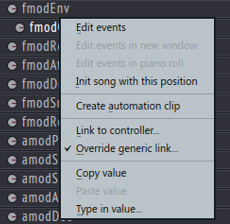


 Move you knob on the keyboard. and we are done
It seems that the settings not get saved .


So you need to do like this every time.


IL Remote for FL Studio

Image-Line Remote | Android & iOS MIDI Controller App FL Studio Demo


Well i will try something new.
There is possible to use your Ipad as an drum mashine into Fl Studio.

See video above

So today i will try that. And see if i am able to do this.

RollingStone.com: Music News

My Soundcloud


My Youtube channel
