
Electrical software for engineers
I will put some learning videos for engineers here.The reason i do this is that there are so much wrong info.
If you are an electrical person that use 48 Dc to higher volt Ac, there are the tools i would learn.
Some webpages do not know the difference between any electrical engineers.
I am have my background from high voltage and powerstations.
Amd has be a projectleder from 48 V Dc. And to calculate 440 Volt Ac. This is the normal way. But i also have background on high voltage.
Today i want to show you the tools you might have use from.
1.Dialux
This is a software to calculate the lux for rooms. And electrical engineer have to be able to find the right light. And this you calculate in dialux.
But you need the standard for every room.
This only as an example.

There is standard for every room. Like above
Fitnessroom should have 300 lux.
These standard is in Norway done by https://lyskultur.no/
Most standard can be bought from https://www.standard.no/
Dialux have many youtube video you can learn from.
Dialux can be used in Autodesk revit as a plugin.
2.Glamox Optiwin
Import a 3d Model Into Optiwin
This is software to calculate the light in a room.
Download it from here
I will use my blog as a tool for my work. But i share things with others that might have an interested in what i do.
Nowadays i see it is possible to do things in a different way.
And i want to learn others what i did.
Learn anything from your home here
Download software and learn it in you own home.
Change your skill level to what the marked want.
Myself i knew nothing about Autodesk Revit. So here is what i did.
I found some nice course and used youtube and udemy as my teacher.
Then downloaded the tools i needed to learn.
Then trained myself to what a company wanted.
I will post more in this article as i move along.
I wanted to learn Revit because oil and gas companies use this software.
Here is the course i take at Udemy.


There is also other things that you should do.
- Find a job, check what they want of skills. Find a online course and build you skill up before you apply.
When you come to an interview, you can then show that you have just gone to a course and have the basic skill to do......
I also learn other things in this way.
3.Safran Project
Introduction to Safran Project
Demo - Safran Project SRA = Schedule Risk Analysis
Used by oil and gas companies
4. Autodesk Revit Electrical or MEP
This is the best tool i have seen for DAK.I really hate autocad. Because you have to think snap, paperspace,modelspace annd so on. Revit has nothing of this.
So i try to learn myself only this software.
Video
How to create Circuit in Revit MEP 2017. This is a playlist on how to do
But what is possible is to use Autodesk Revit to calculate the lux, as you draw in the light fixture.
Here shown by Learning with Rich.
1. Select space, then 
2.
here the lux is shown when you draw a new light fixture.


So then you do not need to run a dialux calculation. But you might transfer your drawing from Revit to dialux.
How to connect your drawing to the power
Create power to the light

- Select one light fixture.
-The go to power press on it.
-Then go edit circuit

Then add the other light fixture to the system.


The click the panel

Then you see all is now connected to the panel

And this is how you do this prosses.
See the video from learning with Rich
Revit MEP Lesson 18 How To Create a Electrical Circuits
Here is also a manual
Revit MEP - Modeling Electrical Panels, Circuits, and Switches
Youtube channel for BIMtopia
Revit Architecture - Creating and Presenting Model Schedules
Revit 2021: Electrical Circuit Naming
5.Magicad
Magicad is an addon to Autodesk revit.
Where you can calculate electrical systrem after you draw.
Here is some video about Magicad


Create and update switchboard schematics based on electrical models
6.Solidworks Electrical
Here is a learning video
There is also a program that i now will learn myself
It is called SMK Powertools. And is used by companies in USA
See link here
This program can be a plugin for Autodesk Revit. See link here

This post i will try to make it more clear what i did. I post as i have a progress myself.
7.Habit Elcad
This is a Norwegian electrical tool for calculate all kinds of electrical system
See on the drawing. If something is not ok. The the line become red. That mean your system has som problem. It can be that you cable has to high voltage drop. Or the fuse is not ok.
I have drwain in this tool most of my time. Where i have made some templete. And i just change the value as i go along. Then i can do my job really fast.
When you are done you get all documents in a great report.
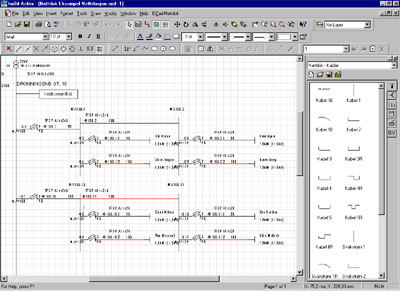

See here you have the whole system in one page.
From high voltage. To transformer. To swithsboard. Then into the house.
I have in fact drawn a whole town in one drawing. The red line show that "this cable has some problem. Might be that the cabel size is to small for that length. Or the fuse not has selectivity.
Video
8.Febdok
This is most used in Norway. But i not like this softare.
And the reason is that drawing is not good enough.
And i like to see the whole system in one page. And can use this when i talk in a meeting. But many use this tool
9.EasyPower Power System Software
Short Circuit Calculations in EasyPower
Revit MEP Integration with EasyPower Power System Analysis
Youtube channel for Easypower
10.ETAP
Short Circuit Result Analyzer
Udemy has 2 courses on this
Convert from SKM and EasyPower to ETAP
11. Autocad .
But i think autocad is to old fasion. Autodesk Revit is the one you should learn.
I have learned autocad but if you want to get an mouse arm. The draw in this tool for 1 week.
As a project engineer you need to learn
SAP, PIMS,Procosys.
Forskrifter ( Norway law)


